DOG TRAINERS AND TRAINING CENTRES · 14 DAYS FREE

Management software for
dog trainers and training centres.

Pets lovers? PetsLab!

More time with animals, less admin. Clients, lessons and Pet Sitting in one app. Organise your day, share photos and videos from stays and keep owners updated in their private area. Work independently with Pro or together with Centres.

Pro or Centres free for 14 days · No credit card required

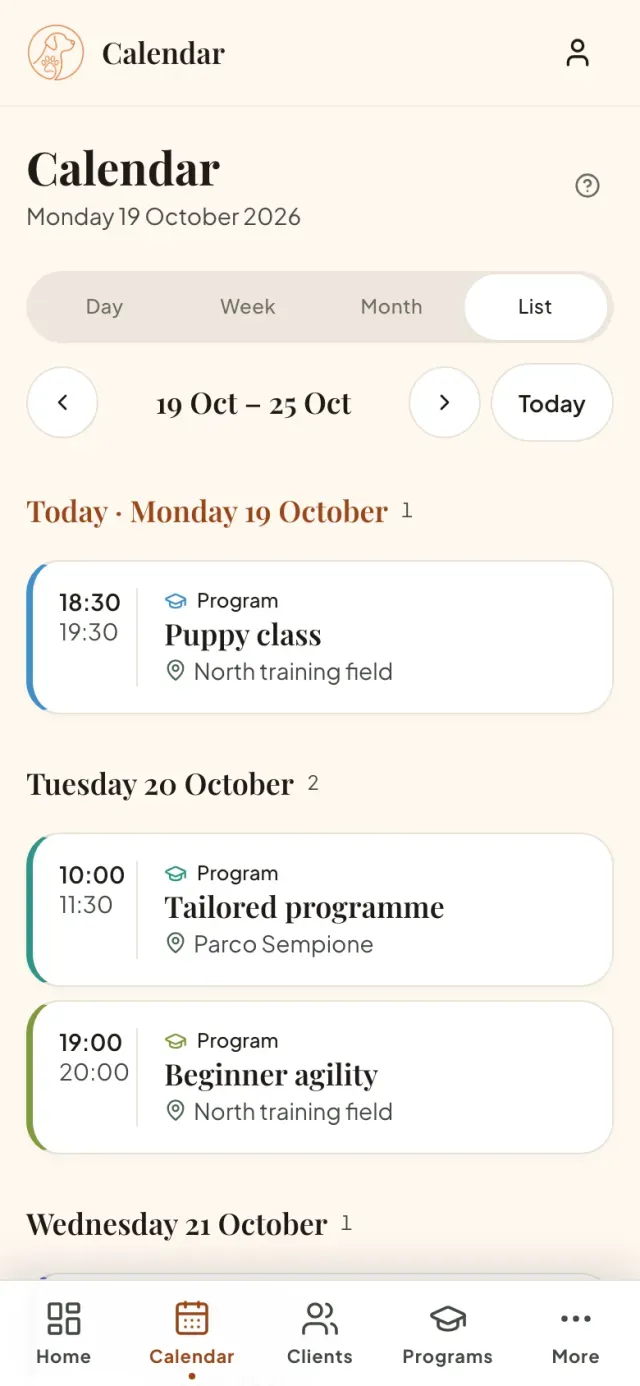
Weekly lesson calendar in the petslab.it app
⇄
Lesson movedPuppy class · Wednesday to Thursday
✓
New enrolmentKira · Beginner agility

You organise.
They keep everything within reach.

A private dashboard for each client: training programmes, linked events and Pet Sitting, alongside their dogs. Clients enter their email address and the code they receive by email, without creating an account or remembering a password.

Are you a client? Open your area
  1. Link a client to an activity

    When you add them to a programme, event or Pet Sitting, they receive an email linking to the client area if email notifications are enabled. To sign in, they request a code by email.

  2. Find dates and activities

    View lessons, events and stays on their phone. Clients using the same email with several centres sign in with one code and choose a centre, keeping everything separate. During Pet Sitting, owners also find the messages, photos and short videos you publish for their dogs.

  3. Update contacts and dog records

    Clients update contact details and notification preferences and complete the dog records you request, in the same private area.

Your job is to care.
Not chase messages.

WhatsApp, spreadsheets, paper diaries and reminders sent by hand. When your tools don’t work together, you lose time — and your clients notice.

Hi! Do you have room for Toby on Friday?
Hi! I’ll check the diary 😊
Does his vaccination need to be up to date?

One home for
all your work.

Clients, appointments and payment records in one place, on your phone or computer. Start with what you need today and organise the rest one step at a time.

▦

Lesson calendar

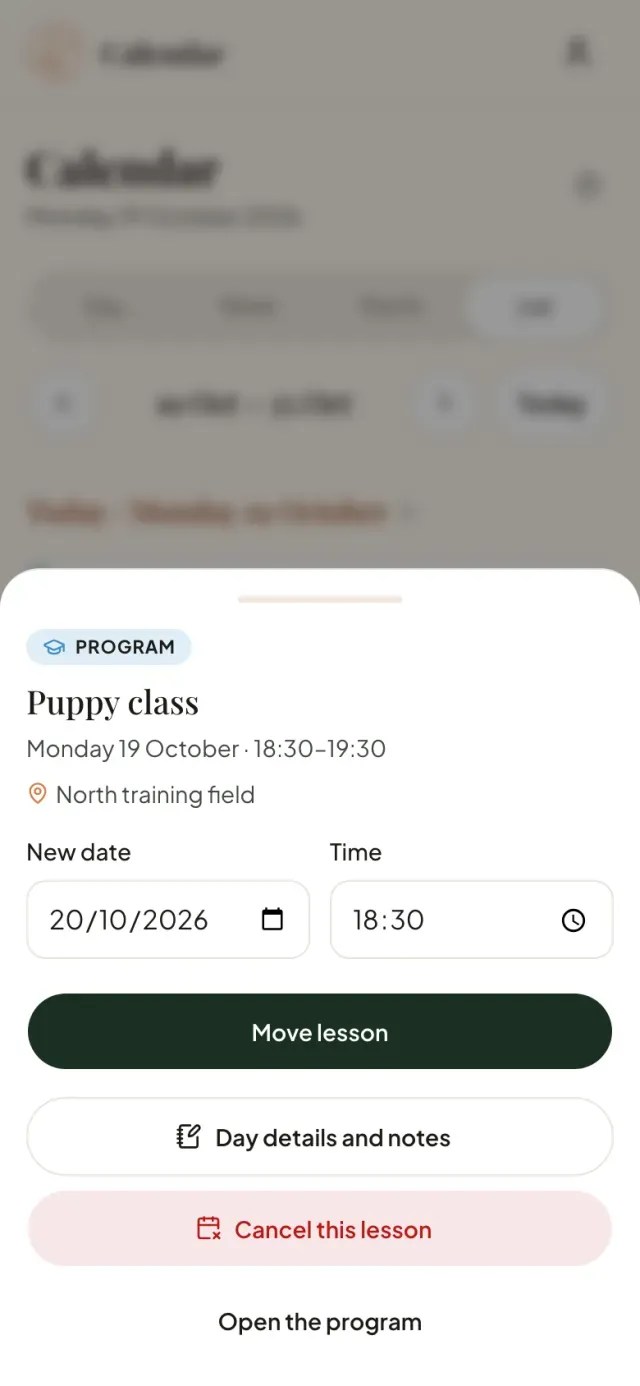
Recurring lessons fill the calendar automatically. Move a date and choose whether to email your clients. With Pro, set working hours and absences: a warning flags lessons outside your availability. Lessons outside availability are also flagged in the calendar.

Guide to reminders and schedule changes
Moving a lesson from the calendar
♡

Clients and their dogs

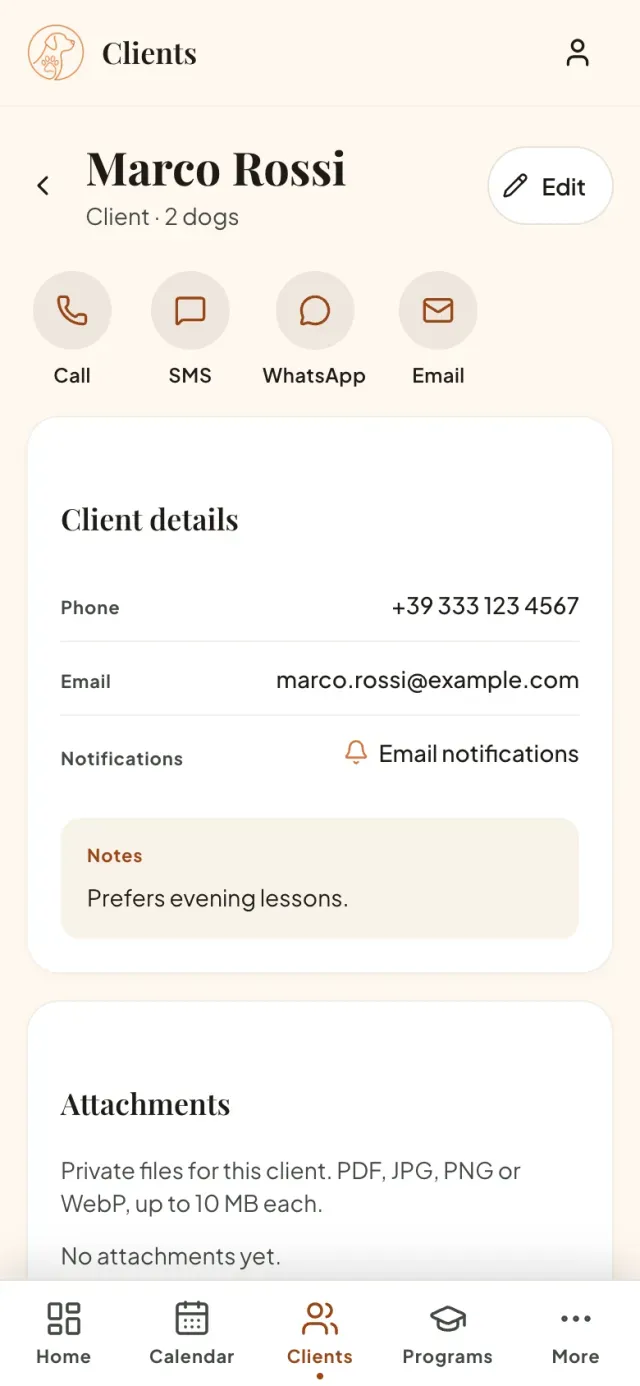
Contact details, health, temperament and programmes in one record, with private PDFs and images attached to each client. Clients receive a reminder before their lesson; you get tomorrow’s email summary and can enable push reminders on your device.

How to organise dog records
Client record with their dogs and programmes
✦

Programmes and enrolments

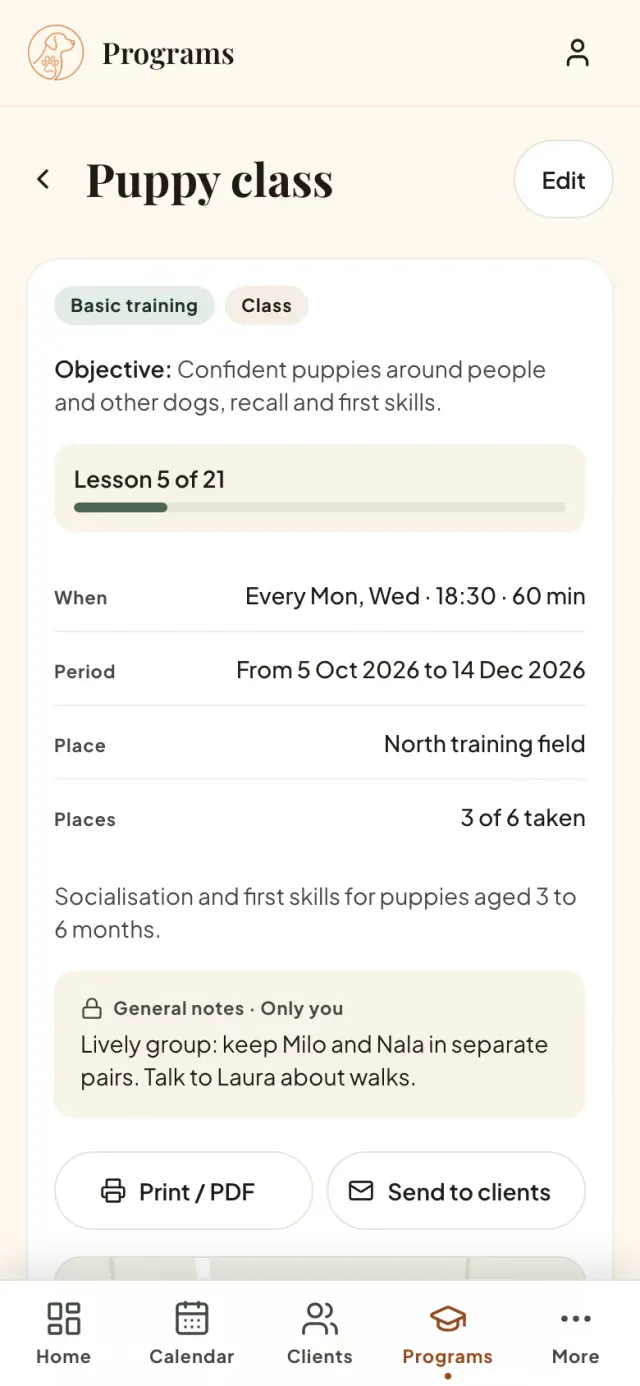
Group or individual programmes, with recurring lessons or custom dates. Enrol dogs, check available places and share the schedule as a PDF or by email. Add several lessons on the same day with different start times.

How to organise clients, programmes and your calendar
Programme details with enrolled dogs
✺

Events with registrations

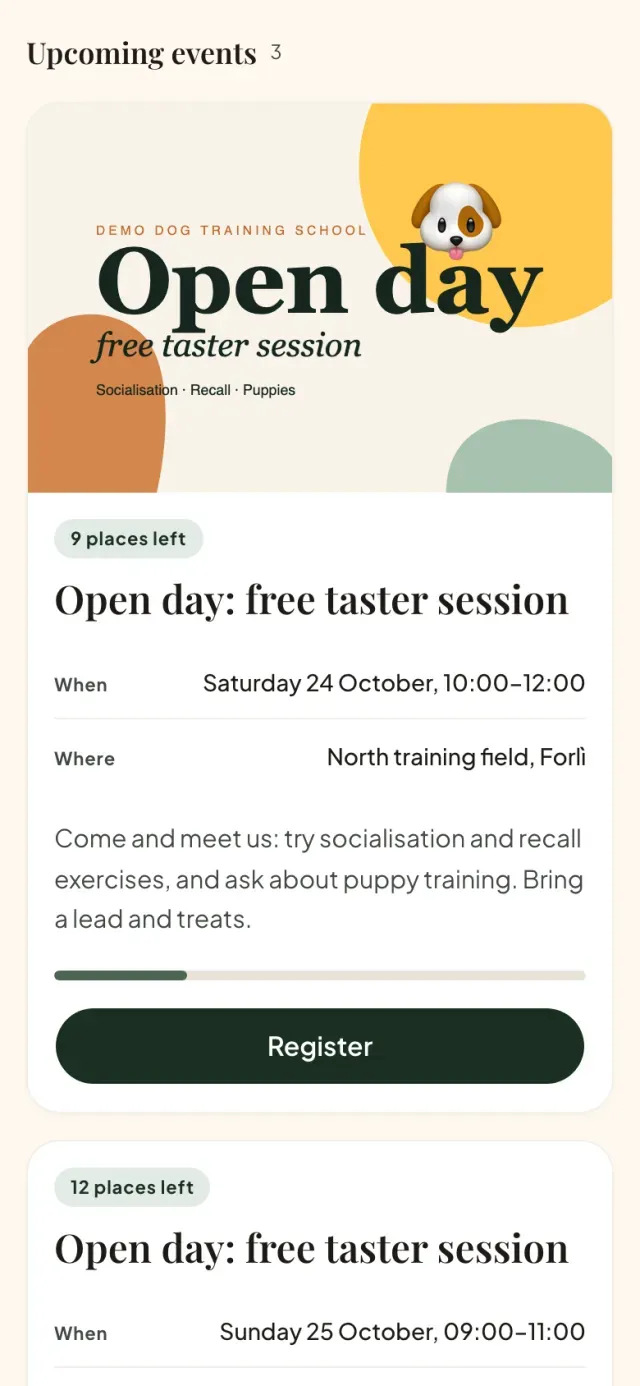
Share your event link and collect registrations online. Prepare reusable forms with custom questions and required answers. Receive an email for each registration and notify participants when plans change.

How to organise a dog training event
Public event with a photo and registration button

Payment records and extra services

With Payments enabled, track prices, amounts due and payments received for programmes and Pet Sitting. With the Centri plan, configure services and duration rates, sell before scheduling and print a non-fiscal purchase summary. Add extra services to a single lesson or activity and see the updated amounts.

  • Extras per day or lesson, as a one-off amount or a percentage
  • Previously assigned prices stay the same when you update the catalogue
  • See outstanding amounts and payments received

Collect payment as agreed with your client and record it in the app.

Daycare, boarding and Pet Sitting

Organise stays and visits with arrivals and departures in the calendar. For daycare and pet sitting, repeat visits on the weekdays you choose.

  • Dogs and owners linked to each stay
  • Cancel a single visit in a series
  • Email the client when dates change
  • Send owners photos, short videos and messages during the stay: they find them in their client area
How to organise arrivals and departures

Clients, programmes and your calendar in one place: try it with your business.

Try free for 14 days →

A photo from their stay.
One less worry for their owner.

Publish a message, photos or a short video from a dog’s stay. Owners find them in their private area, alongside dates and activities.

Try it with your first stay
  1. Share a moment from the day

    Take a photo, record a short video or choose media from your phone. Add a message if you like.

  2. Reach the right owners

    Updates are linked to the stay and its dogs. Each client only sees updates for their own dogs.

  3. Give clients one place to look

    Email alerts and push notifications, when enabled, lead to the private area. Clients view photos and videos there, without searching through chats.

One centre, several educators.
A shared calendar.

Shared clients, dogs and programmes, with unlimited team members. Everyone signs in with their own account and the permissions you assign to their role.

  1. 01

    Know who teaches each lesson

    Every programme has its educator; choose cover for a single lesson when needed. Substitutions follow lessons when their dates change.

  2. 02

    Plan around availability

    Each educator sets working hours and absences. Use the full calendar or filter by educator to organise lessons, with availability and overlap warnings.

  3. 03

    Work together with clear roles

    Invite your team by email and choose who can view, edit or delete in each area. Collaborate with several Centres while keeping data and roles separate. Each educator automatically sees their own assignments and the enrolled clients and dogs. Permissions allow editing their own lessons or extending access to the rest of the centre.

  4. 04

    Assign a box to every stay

    Configure boxes and capacity, assign daycare and boarding stays, and check daily or weekly availability. Conflicting bookings are blocked.

  5. 05

    Manage memberships

    Enable membership management and record or renew cards with expiry after a number of months or on a fixed annual date. Cancel a card or change the rule to recalculate expiry dates. See alerts on client records and programmes; clients with the Email preference receive a reminder within 30 days of expiry.

Your whole team, one subscription for the centre.

Explore the Centres plan

From your first visit
to your first programme, step by step.

  1. 01

    You and your business

    Your name, photo and an overview of programmes, pet sitting and events.

  2. 02

    Your first client

    Add a client and their dog, with the details that matter.

  3. 03

    Your first programme

    Set days and times, with the dog already enrolled: the calendar fills itself.

  4. 04

    Your public page

    Your own address with your profile and events, so people can find you and register.

Choose Pro or Centres when you sign up. Your 14 free days start when you confirm your email; you can skip setup steps and complete them later.

Create your account in a minute, then follow the guided setup.

Try free for 14 days →

More than general admin software.
Your new helping hand.

01

Dog trainers

On your own or with a centre’s team: group and individual programmes, dog records, a calendar and client communications.

02

Daycare & boarding

Manage each dog’s stays at your premises or the client’s home, with arrivals and departures in the calendar, or visits that repeat on the same days each week. If dates change, notify the client by email. With Payments enabled, record daily or nightly prices and who has paid.

How to organise arrivals and departures

Start free.
Choose the plan
for your business.

Try Pro or Centres free for 14 days after confirming your email, with no credit card. Afterwards you move to Free unless you activate renewal. Your data is preserved.

Pro

Free for 14 days

€14.99 per month, VAT included

or €149.90 per year: 2 months free

  • Unlimited clients, dogs, programmes and Pet Sitting stays
  • Working hours, absences and warnings for lessons outside your availability
  • Cancel whenever you like, with no commitment
Try free for 14 days →

Centres

Free for 14 days

€24.99 per month, VAT included

or €249.90 per year: 2 months free

  • Everything in Pro
  • Dedicated features for managing your dog training centre
  • Unlimited team members with roles and permissions
  • Shared clients, dogs, programmes and calendar
  • Assigned educators, lesson cover and a calendar filtered by educator
  • One subscription for the whole centre
Try Centres free →

Free

€0 forever

  • Up to 3 active dogs (in programs or stays that have not ended, including future activities); unlimited dog records.
  • Calendar, events, Pet Sitting, client area, email and payment records

Your plan if you do not activate renewal. Your data is preserved.

Each dog counts once, even across several programmes or stays. Activities that have not ended count, including future ones; archived programmes are excluded. Above the limit, you keep everything and can manage already active dogs without activating additional ones.

Common
questions.

Can I use WhatsApp for notifications?

With WhatsApp Business connected and the service enabled, you can send notifications to clients who have consented. Email and WhatsApp have independent preferences. Photos and videos from stays are viewed in the clients’ private area.

What happens after 14 days?

To continue with Pro or Centres, activate monthly or yearly renewal and add your card. Your first charge is at the end of the trial, followed by automatic renewals. Otherwise, you move to Free and keep your data. With Centres, collaborator access is suspended until you reactivate the plan.

Can I collaborate with more than one Centre?

Yes. With the same account you can use your own activity and collaborate with several Centres, with separate data and roles. Choose an activity from the selector when it is needed. If you register from an invitation, you join the Centre without creating your own activity; you can create it later with “Create your activity”.

How much does it cost?

Choose Pro or Centres and try it free for 14 days after confirming your email, with no card. Pro then costs €14.99/month or €149.90/year; Centre €24.99/month or €249.90/year, VAT included. Activate renewal explicitly, or automatically move to Free and keep your data.

What happens if I reach the Free plan limit?

Nothing is deleted: your clients, dogs, programmes and Pet Sitting stays remain available to edit. Upgrade to Pro from your profile to add more, or archive a completed programme.

Do I need to install anything?

No. petslab.it runs in your browser on a phone, tablet or computer. On your phone, you can add it to your Home Screen and use it like an app.

Can I work with my team?

Yes. With Centres, invite team members by email, assign roles and permissions, and manage the same activity. The owner manages billing and closure. Assign educators to programmes, manage lesson cover and filter the calendar by educator. Anyone who already has a personal activity keeps it separate and can switch between activities.

I work on my own. Is it for me?

Yes. petslab.it is built for trainers who manage their own clients, programmes and calendar.

Do my clients need to register?

No. They access their private area by entering their email address and the code they receive by email, without creating an account or password. They can view activities and update their contact details. To register for an event, they just need its link or your public page.

Where is my data? Can I export it?

Your data is hosted on servers in the European Union. You can export it from your profile whenever you want, or delete your account and all its data.

I also run daycare or boarding. Will it work for me?

Yes. The Pet Sitting section tracks each dog’s stays (daycare, boarding and pet sitting), with arrivals and departures in the calendar.